.
The Hidden Architecture of Google Gemini: 4 Secret Engines Running in the Background
Everyone thinks AI is just a magic text box appearing on a screen. When you type “write me a poem” or “fix this code,” you might assume there’s a single brain answering you. But the reality is completely different.
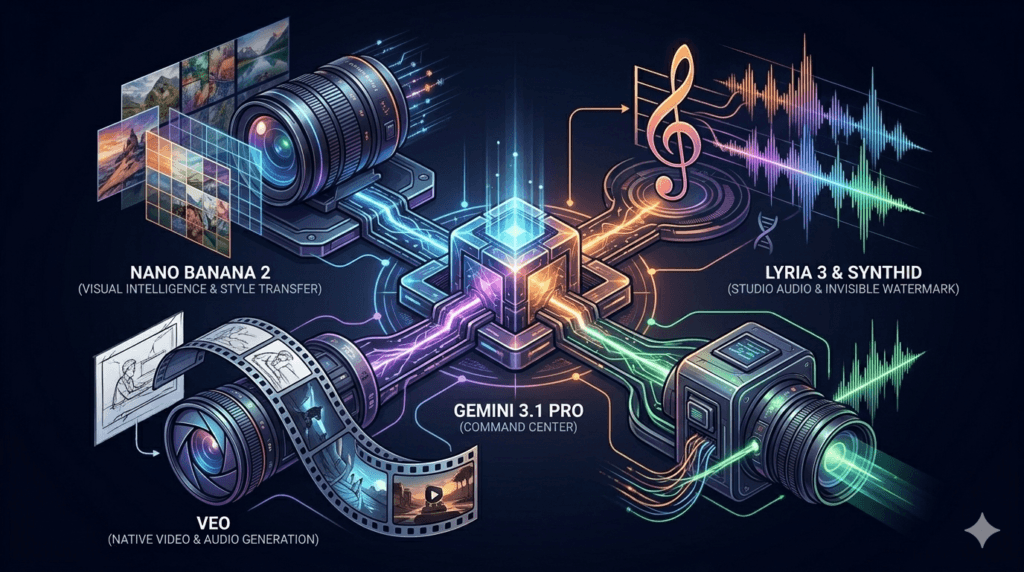
Google Gemini is not actually a single model; it is a flawless ecosystem composed of massive, hidden engines, each specialized in its own domain. Here are the 4 secret architectures Google operates behind closed doors that most users have never even heard of:
1. The Codenamed Visual Intelligence: “Nano Banana 2”
When you type “Draw me a cyberpunk city,” you aren’t actually talking to Gemini, but to the engine officially known as Gemini 3 Flash Image, or by its engineering codename, “Nano Banana 2.” This system isn’t your average “text-to-image” tool. Its greatest capability is taking multiple different photographs and seamlessly blending them into a new composition, or performing complex “style transfers” between images. It is the invisible art director working in the background.
2. Invisible Digital DNA: “Lyria 3” and “SynthID”
If you ever ask Gemini to produce music, the “Lyria 3” model takes the stage. Lyria 3 can transform your text or image into a 30-second, studio-quality track with professional vocals and instrumentation in seconds. But the real secret lies elsewhere. Embedded into every sound wave produced by Lyria 3 is an inerasable digital watermark (DNA) called “SynthID.” It is completely inaudible to the human ear but can be instantly detected by AI scanners.
3. The Hollywood-Grade Video Engine: “Veo”
Most videos generated by AI tools are silent, bizarre, and defy the laws of physics. The “Veo” model, which powers Gemini’s video wing, completely changes the game. Veo generates high-fidelity videos natively with their own audio. Even crazier; you can feed the system just the first and last frames of a desired sequence and command it to “generate the entire flow and fill in the missing scenes in between.”
4. The Main Command Center: “Gemini 3.1 Pro”
The master brain that coordinates all these visual, auditory, and video engines, executes complex logic, and maintains those deep, strategic, extended conversations without losing its memory is Gemini 3.1 Pro. Optimized for mobile but designed to handle the most complex workflows and long-winded interactions, it is the invisible conductor of the orchestra.
AI doesn’t just write text; it sees, hears, composes, and directs. Which engine are you utilizing?
How to Actually Use These 4 Engines in Your Daily Workflow
Most Gemini users only scratch the surface. Here’s how to put each hidden engine to work:
Nano Banana 2 — Visual Intelligence
Stop using it just for basic image generation. Upload two different product photos and ask Gemini to blend them into a single cohesive visual. Or take your brand’s color palette and apply it to any stock image using style transfer. Content creators are saving 3-4 hours per week using this feature alone.
Lyria 3 — Music Generation
You don’t need to be a musician. Type “create a 30-second upbeat background track for a YouTube intro” and Lyria 3 handles the rest. The SynthID watermark also means your content is protected — AI scanners can verify it was ethically generated, which matters more and more for brand credibility in 2026.
Veo — Video Engine
The first and last frame trick is a game changer for marketers. Create your opening scene, define your closing scene, and let Veo fill in the entire story. This is how small teams are producing Hollywood-quality product demos without a single camera.
Gemini 3.1 Pro — The Brain
Most people reset their conversations constantly. Stop doing that. Gemini 3.1 Pro is built for long, extended sessions. Keep one ongoing conversation for each project — it remembers context, builds on previous answers, and gets smarter about your specific needs over time.
Which Engine Should You Start With?
If you are a content creator → Start with Nano Banana 2
If you are a marketer or YouTuber → Start with Veo
If you run a podcast or music project → Start with Lyria 3
If you manage complex projects → Start with Gemini 3.1 Pro
The smartest users don’t pick just one. They build a workflow that combines all four — visual, audio, video, and intelligence — into a single automated pipeline.
Ready to explore? Visit Gemini and start with whichever engine matches your biggest current challenge.